
Match control
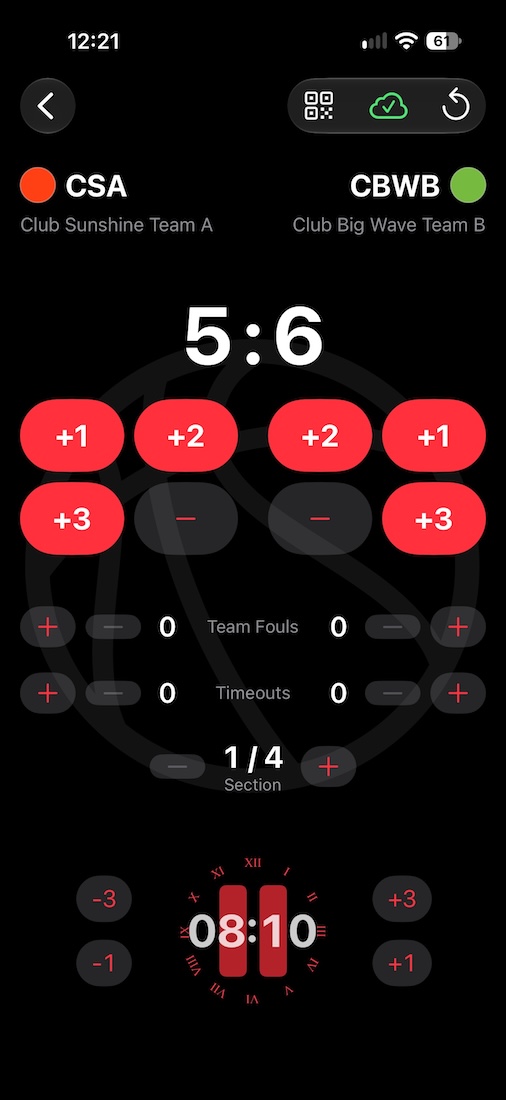
Clock and score
- Tap the clock to start and stop it. At the end of a section it stops by itself where the rules say so; the next tap starts the next section.
- Tap a score to count a goal, − takes the last one back.
- Penalties count down next to the team, the clock stops and goes on with them.
- The color button next to a team chooses its jersey color – the named colors of the club, or any other.
Sports
- Clock and goals: handball, football, hockey, water polo …
- Clock and points: basketball with team fouls and timeouts, American football with down, distance and possession, rugby.
- Sets: volleyball, badminton, table tennis – with serve, sets won and the points of the current set.
Leaving and closing
A started match stays active when you leave the control, also when the app ends – a running clock goes on. The start screen marks it and offers Continue and Close Match. Closing writes the result to the fixture; without network it goes out later.
Going on on another device
When a device fails during a game – an empty battery – or you hand over after a section, another device of the account goes on with the game. On its start screen the fixture shows Being played on … and Take Over: score, clock, section and penalties come along, a running clock goes on and can be corrected. The other device ends the game without a result. The widget and MatchTicker links of the fixture follow without interruption. A free game is taken over under Free Match, where the free games of the other devices are listed.
Timeline
Goals, points and penalties are recorded with match clock and time of day. The timeline stays with the fixture after the game and is shown by the timeline widget – live while the game is played, afterwards as played.
iPad
In landscape, the match control opens next to the start screen, both stay usable.